Private AI DevOps Engineer with DeepSeek + AIOps
A private, free, locally-hosted AI coding assistant with Prometheus and Grafana monitoring and agentic workflows, at zero API costs.
- API costs
- $0
- API costs
- Private & on-prem
- 100%
- Private & on-prem
- Web UIs + agentic AI
- 3
- Web UIs + agentic AI
The Problem: AI Assistants Are Great, But…
You've used GitHub Copilot. You've chatted with ChatGPT. They're powerful until you hit the paywall, the rate limits, or the nagging feeling that your proprietary code is being sent to some server you don't control.
What if you could run a private, free, locally-hosted AI coding assistant that also watches your server metrics and predicts failures before they happen?
“No API costs. Code never leaves your server. It predicts outages. And now, it codes for you autonomously.”
What's Inside This Setup?
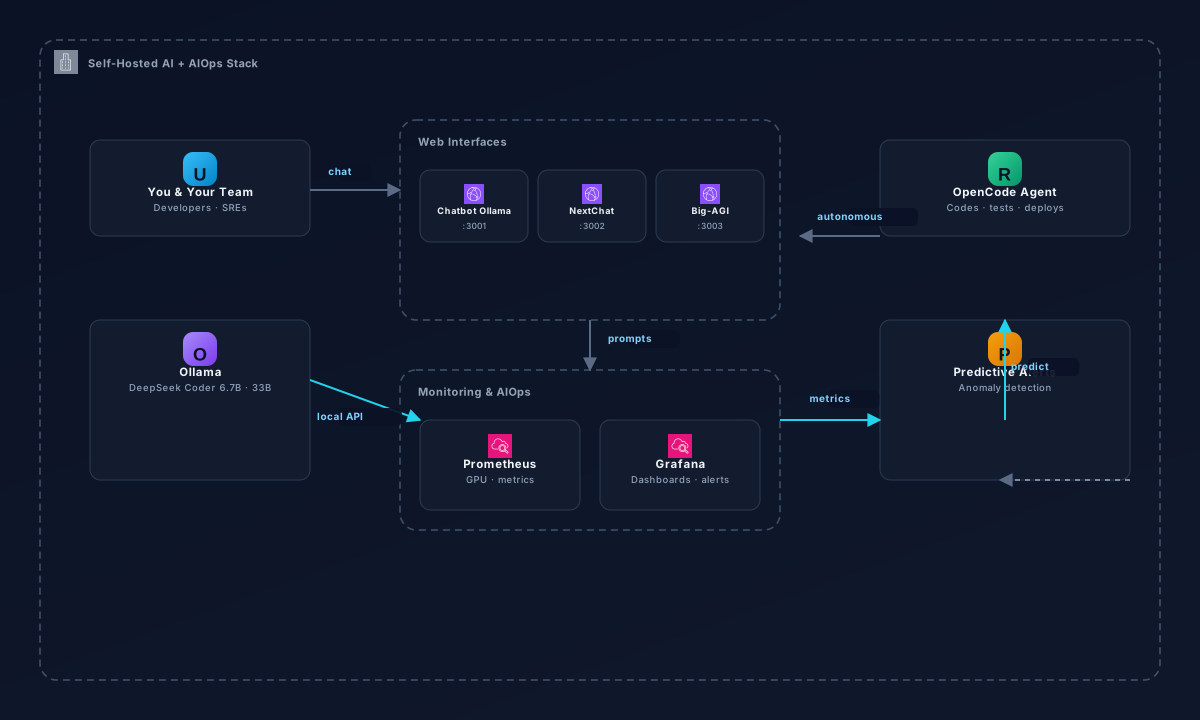
The repository documents a complete, production-ready environment built around DeepSeek Coder models running via Ollama, wrapped in multiple web UIs, and monitored with Prometheus + Grafana for AI-driven operations (AIOps).
DeepSeek Coder via Ollama
Local LLM inference with no API keys, no usage limits, full privacy
Multiple Web UIs
Chatbot Ollama, NextChat, and Big-AGI for different workflows
Prometheus + Grafana
Real-time monitoring of GPU usage, model performance, and system health
OpenCode Agentic Workflows
Autonomous AI agents that can code, test, and deploy independently
Architecture Overview
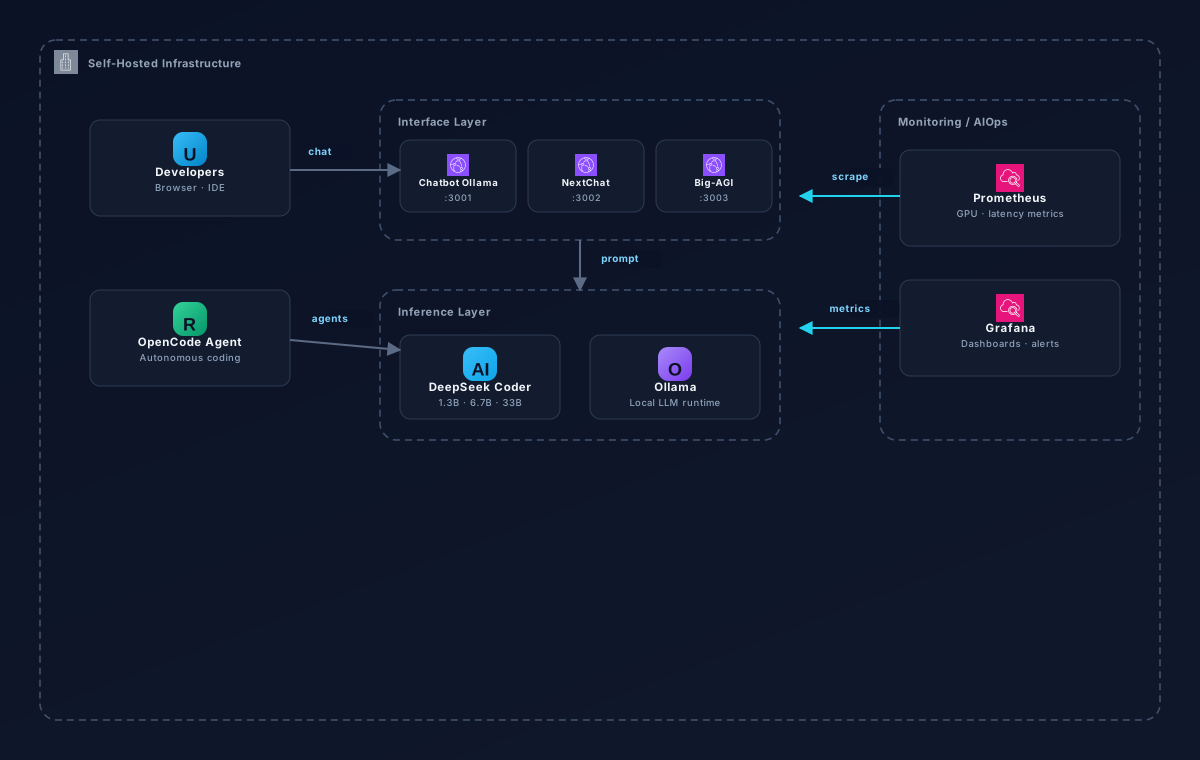
The system is composed of several interconnected layers:
Inference Layer
Ollama serves DeepSeek Coder models locally. Supports multiple model sizes (1.3B, 6.7B, 33B) depending on hardware. Handles quantization, memory management, and GPU acceleration.
Interface Layer
Multiple web UIs connect to the Ollama API, including Chatbot Ollama for quick interactions, NextChat for a polished chat experience, and Big-AGI for advanced multi-model workflows.
Monitoring Layer
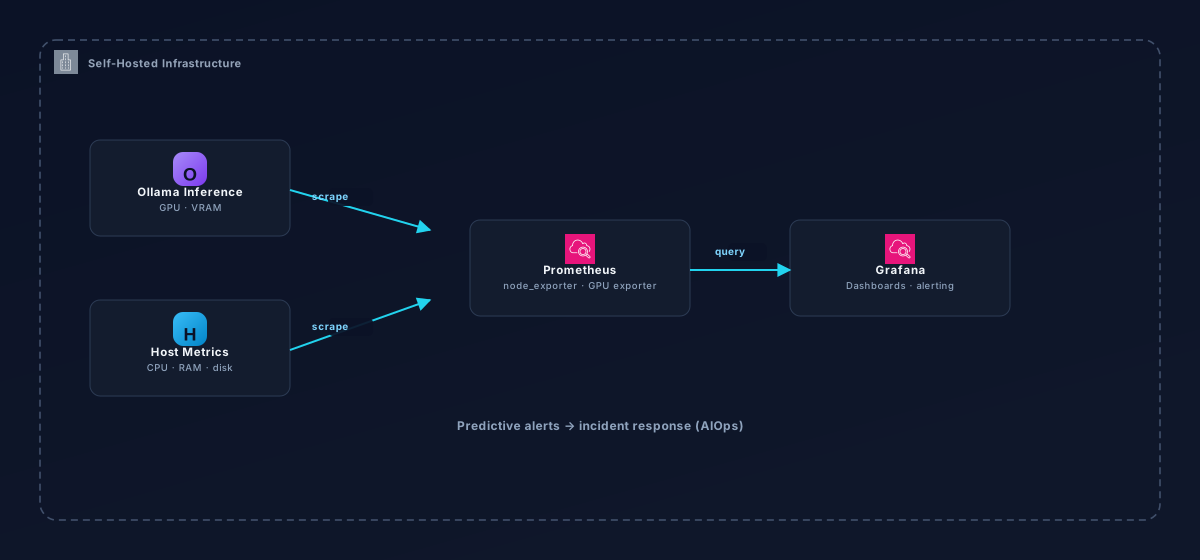
Prometheus scrapes Ollama and system metrics. Grafana dashboards visualize GPU utilization, inference latency, memory usage, and request throughput in real time.
Agentic Layer
OpenCode integrates with the local LLM to enable autonomous coding agents that can read files, write code, run tests, and iterate on solutions without human intervention.
Installation & Configuration
Prerequisites
- •Linux server with GPU support (NVIDIA recommended)
- •Docker and Docker Compose
- •Minimum 16GB RAM for 6.7B model, 32GB+ for 33B
- •10-50GB disk space depending on model sizes
Quick Start
# Install Ollama
curl -fsSL https://ollama.com/install.sh | sh

# Pull DeepSeek Coder
ollama pull deepseek-coder:6.7b

# Run with monitoring
docker compose up -d

# Access web UIs
# Chatbot:  http://localhost:3001
# NextChat: http://localhost:3002
# Grafana:  http://localhost:3000
Real DevOps Tasks
The setup has been tested against real-world DevOps scenarios:
Log Analysis
Parse and summarize application logs to identify error patterns and root causes
Scaffolding
Generate boilerplate code for new services, Dockerfiles, and CI/CD pipelines
Test Generation
Automatically create unit and integration tests for existing codebases
Bug Fixing
Identify and fix bugs with contextual understanding of the full codebase
Model Selection Guide
Choosing the right model depends on your hardware and use case:
| Model | RAM | Speed | Best For |
|---|---|---|---|
| 1.3B | 4GB | Fast | Quick completions, low-resource |
| 6.7B | 16GB | Balanced | General coding, daily use |
| 33B | 32GB+ | Slower | Complex reasoning, large codebases |
Skills & Technologies
Troubleshooting
- •GPU not detected: Ensure NVIDIA drivers and CUDA toolkit are installed correctly
- •Out of memory: Reduce model quantization level or use a smaller model variant
- •Slow inference: Check GPU utilization in Grafana; ensure no other processes are competing for VRAM
- •Web UI connection issues: Verify Ollama is running on the expected port (default: 11434)
Like what you're seeing?
I'm always up for tackling challenging infrastructure, automation, and AI/DevOps problems. Let's build something together.